Short answer
IPTV stands for Internet Protocol Television. Instead of a dish, an aerial or a cable box, live channels and on-demand films reach your screen as a stream over your broadband, inside an app on a TV, Firestick, phone or computer you already own. You need three things: a subscription line (a login), a player app and a steady connection of roughly 25 Mbps. IPPlayTV delivers 80,000+ live channels and 270,000+ movies and series this way, from $15 for a month.
The phrase sounds like something from a networking manual, but you already use the idea every day: the same connection that loads a web page or a video call can carry a live football match to the television in your living room. What changes is everything around the screen. No engineer visit, no rented box per room, no regional bundle, and a channel list that is no longer limited by what fits down a cable. This guide explains what IPTV is, how the picture actually gets to you, what you need, and where it beats, and loses to, the way you watch now.
IPTV Meaning in Plain English
Break the name into its two halves. Television is the part you know: live channels, a programme guide, films and series. Internet Protocol is simply the way data travels across the internet in small numbered packets. Put together, IPTV is television that travels the way web traffic does.
The practical difference from broadcast TV is direction. A satellite or cable network pushes every channel to every home whether anyone is watching or not. With IPTV, your app asks for one channel, and the server sends that one stream to you alone. Because nothing has to fit on a shared cable, a service can carry channels from dozens of countries and a full on-demand library side by side.
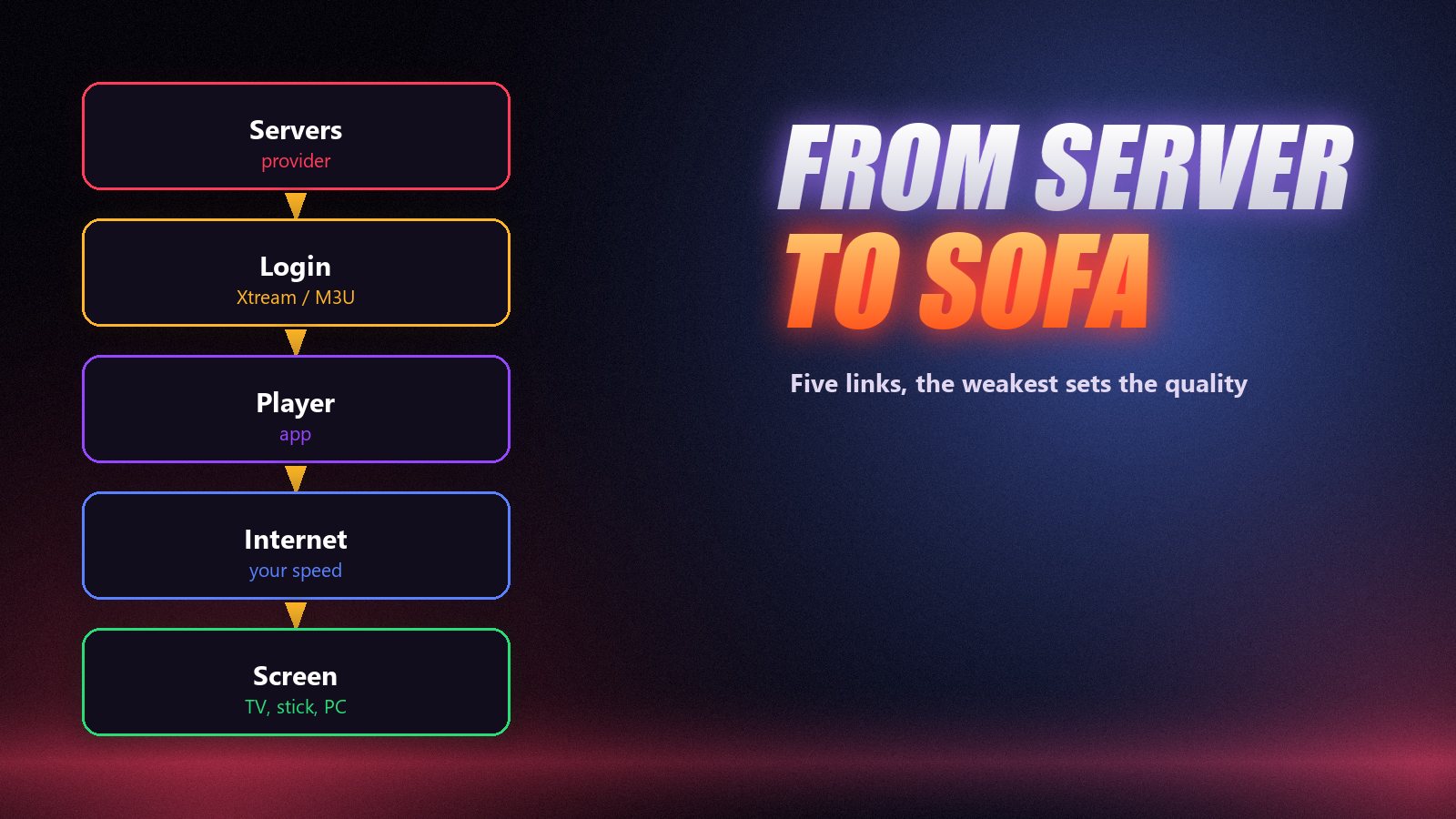
How IPTV Works, From Server to Sofa
Every IPTV picture passes through the same chain. When something goes wrong, it is always one of these links, which is why it is worth knowing them.
| Link | What it does | What decides the quality |
|---|---|---|
| The provider’s servers | Receive channels and send them out as internet streams | Capacity at peak time and how many viewers share each server |
| Your login | A server address, username and password, or one M3U link | Nothing, as long as it is typed correctly and active |
| The player app | Loads the channel list and guide, plays what you pick | Decoder support and how well the app handles live streams |
| Your connection | Carries the stream from the internet to the screen | Real speed in the evening, Wi-Fi vs Ethernet |
| The screen | TV, Firestick, box, phone or computer | Whether it can decode HD, FHD or 4K smoothly |
When you press a channel, the app requests it, the server starts sending, and the player holds a few seconds in reserve before showing the picture. That buffer is why a channel takes a moment to start, and why a weak connection shows up as a spinning wheel instead of a blank screen. Our guide to fixing IPTV buffering goes through that link by link.
What an IPTV Subscription Includes
- Live channels sorted by country and category: news, sport, films, kids, documentaries, music, religion and local stations.
- Movies and series on demand, with posters, plots and often several audio and subtitle languages.
- A programme guide (EPG) showing what is on now and next, up to a week ahead.
- Sport and pay-per-view events as they happen; see watching live sport anywhere.
- Several screens at once on longer plans, so different rooms can watch different things.
At IPPlayTV every plan opens the same library of 80,000+ channels and 270,000+ titles in 4K, FHD and HD. The plan length only changes the price per month and how many devices can watch at the same time. The full line-up is on the channels page.
What You Need to Start
| You need | Most people use | Good to know |
|---|---|---|
| A subscription line | An IPTV plan, or a free trial first | Arrives as Xtream Codes details or an M3U link |
| A player app | IPTV Smarters Pro, TiviMate, VLC | Free or a few dollars a year |
| A device | Smart TV, Firestick, Android box, phone, PC | Step-by-step guides on our installation page |
| Internet | 25 Mbps for FHD, 35 Mbps for 4K | Test on the TV itself, in the evening |
If you already own a Firestick, our Firestick guide gets you running in about ten minutes. For Samsung, LG and Android TVs, start with IPTV on a Smart TV, and for a laptop see watching IPTV on a PC or Mac.
IPTV vs Cable, Satellite and Streaming Apps
| IPTV subscription | Cable / satellite | Streaming apps | |
|---|---|---|---|
| Typical monthly cost | $5–$15 | $80–$220 | $10–$80 each |
| Live channels | Tens of thousands | A national package | Few or none |
| Equipment | Devices you own | Rented box per room | Devices you own |
| Works without internet | No | Yes | No |
| Contract | None, prepaid term | Often 12–24 months | Monthly |
Cable still wins in one situation: a home whose broadband is slow or unreliable in the evening. Everywhere else, IPTV costs a fraction of the bill and follows you to any screen. We worked through the real numbers in IPTV vs cable TV.
How to Choose a Provider
The word IPTV covers well-run services and overloaded ones that vanish after a season, and they look the same on a sales page. Judge a provider on things you can check: a trial or money-back window, support that answers before you pay, published prices, and a picture that holds steady during a big match on your own connection. Reddit’s regulars use much the same list; we summarised it in best IPTV according to Reddit.
Getting Started in Four Steps
- Check your speed on the TV or stick itself, at around 8 p.m.
- Install a player app; IPTV Smarters Pro is the simplest first choice.
- Ask for a free trial on WhatsApp, then pick a plan on the pricing page.
- Enter the login exactly as sent and watch something live at prime time. Our setup guide covers every device.
Frequently Asked Questions
What does IPTV mean?
IPTV means Internet Protocol Television: live TV channels, films and series delivered over an internet connection rather than through a satellite dish, an aerial or a cable line. You watch it in an app on a TV, streaming stick, phone or computer.
How is IPTV different from regular TV?
Regular TV broadcasts every channel to every home at once over a dish, aerial or cable. IPTV sends only the channel you pick, as a stream over the internet, the moment you pick it. That is why it works on any screen with a connection and can carry far more channels.
Do I need a special device for IPTV?
No. A Smart TV, Amazon Firestick, Android TV box, phone, tablet or computer can all run an IPTV player app. A separate device only helps when an older TV has no suitable app in its store.
What internet speed does IPTV need?
Around 15 Mbps for HD, 25 Mbps for Full HD and 35 Mbps or more for 4K, measured on the device itself during the evening. A wired Ethernet connection or 5 GHz Wi-Fi keeps the picture far steadier than 2.4 GHz Wi-Fi.
Is IPTV legal?
The technology is legal and is used by telecom companies all over the world. Whether a particular service is lawful depends on the rights it holds for what it carries and on the law where you live, so check the rules in your country.
How much does an IPTV subscription cost?
Most independent IPTV subscriptions cost $10 to $20 for one month and $5 to $8 a month on longer plans. IPPlayTV is $15 for one month, $80 for a year and $120 for two years, with a lifetime plan offered as a limited promotion.
Television over the internet, on the screens you already own.
80,000+ live channels and 270,000+ films and series in 4K, FHD and HD, a free trial on WhatsApp, and a 7-day money-back guarantee on every plan.